Learning:
Curious? Want to learn more from other inspiring photographers around the world? Check out a few of the links below…
 [sourced from FixThePhoto.com]
Reputable Professional Photographers + Education Sites:
Rick Sammon’s – Website
https://ricksammon.com/
Rick Sammon’s -YouTube Page
https://www.youtube.com/c/ricksammon/videos
George Lepp’s – Website
http://www.georgeleppimages.com/
Anthony Morganti’s – YouTube Page
https://www.youtube.com/user/anthonymorganti
Nigel Danson – Landscape Photography Adventure and Inspiration – YouTube Page
https://www.youtube.com/c/NigelDanson/videos
Mark Denny – Landscape Photography – YouTube Page
https://www.youtube.com/c/MarkDenneyPhoto/videos
photoshopCAFE – Photoshop Tutorials – YouTube Page
https://www.youtube.com/c/photoshopcafe/videos
Canon Learning – Website
https://www.usa.canon.com/internet/portal/us/home/learn
Found Artists – Website
http://foundartists.com/
DOF Simulator – Interactive Website
https://dofsimulator.net/en/
Virtual lighting studio – Interactive Website
http://www.zvork.fr/vls/
Google Image search – Website
https://images.google.com/
Dubuque in the Library of Congress – Website
https://www.loc.gov/search/?in=&q=dubuque
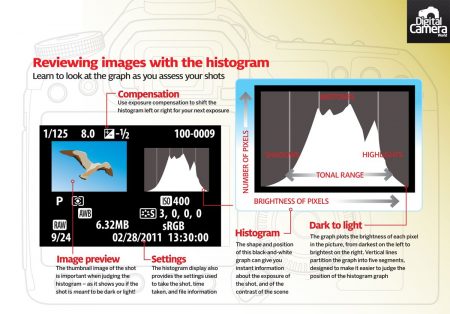
Using Histograms: A vital part of photography is knowing your histogram!
- Number one opportunity seen, when conducting Photography Workshops
- Quickest way to get out of Automatic and into Manual.
- Camera should be set up to display Histogram in photo review on monitor after making a photograph.
- Histogram can be controlled by changing Shutter Speed, Aperture, and ISO or combinations of all.
 [sourced from Digital Camera World]
How to use a Histogram videos.
https://www.youtube.com/watch?v=FcGU1Kpl0sM Short simple to the point. Covers everything needed.
https://www.youtube.com/watch?v=XtdQz6piFpI More in depth. Shows how to set up Nikon and Canon cameras to display Histogram on photo review.
https://www.youtube.com/watch?v=p4khMgk22IA Advance more theories for using.
Inspiration:
2023 Grand Imaging Award Finalists
30 Best Winning Photos From The 2022 All About Photo Awards
Washington Post 23rd annual Travel photo contest winners
Silos and Smokestacks photo contest winners
Lightroom latest features 2025
Lightroom – 2025 Major Features Teaching Outline
Focus: What’s new this year + key talking points
Assisted Culling (AI-Culling) – New in 2025
- A new AI-powered workflow that helps you quickly identify best shots and reject weak ones. Adobe Help Center+1
- Works both during import and on existing folders/collections. Adobe Help Center+1
- Filters/sliders include: Subject Focus (how well the main subject is in focus), Eye Focus (for human eyes), “Eyes Open” (for portraits). PetaPixel+1
- You can set the AI to “Reject photos without people’s eyes” – signals it’s currently optimized more for portraits/human subjects. Digital Camera World+1
- After AI analysis you see: Selects (good), Rejects (weak). You can override manually (right-click to mark as Select/Reject). Digital Camera World+1
Auto-Stacking (2025)
- Linked to the culling workflow: After AI helps pick selects/rejects, Auto-Stack groups similar shots (by time + visual similarity) for easier organization. PetaPixel+1
- Example: A burst of elk walking across river bank → grouped into a stack so you can evaluate the best frame.
Auto Dust Removal (2025)
- A tool in the Distraction Removal section: automatically detects sensor-dust or lens-dust spots and applies healing. PetaPixel+1
- Batch-apply across several images—huge time-saver for shooters working in dusty environments (e.g., field trips, farmland, mining sites).
Color Variance Slider in Point Color (2025)
- Within the Point Color tool (select a specific color area), the new Variance slider lets you control how broad or narrow the color adjustment influences similar hues. PetaPixel+1
- Example uses:
- Face/skin tone correction: narrow variance so you only affect mid-tones, not lips or hair.
- Landscape: enhance orange/gold in farmland without affecting greens.
Zoom While Cropping (2025)
- You can now zoom into the image while you’re cropping, enabling more precise crop-framing and subject placement. Adobe Help Center+1
Generative Remove (New in Lightroom 2024–2025)
What to mention
- Lightroom’s version of Photoshop’s Generative Fill.
- Removes objects more seamlessly than older “Heal/Clone.”
- Fills in complex backgrounds (water, foliage, textures).
- Cloud-based, high-quality, and non-destructive.
- Works directly in Classic and Cloud.
- Use case:
- Clean up powerlines, signs, or clutter in small towns when shooting
Performance Improvements (2025)
- GPU-accelerated preview generation, faster UI responsiveness, smoother crop/editing operations. PetaPixel+1
- Example: Moving sliders or rotating crop faster with large RAW files (beneficial for high-megapixel cameras you use).
Enhancements to Remove Tools & Masking (2025 updates)
- Improved object-and-shadow detection in the Remove tool: removes object and its shadow/reflection when “Detect Objects” is enabled. Digital Camera World+1
- Improved landscape masking (e.g., snow detection in “Select Landscape” masks) → better targeting for your Midwestern outdoor work. Digital Camera World
Other Minor but Useful Additions
- New sidecar/ACR file handling for AI edits (for those working RAW workflows). Michael Clark Photography
- Tech Preview: Improved search (Web Lightroom) – search by descriptive phrases rather than only keywords.Digital Camera World
- Mobile/Cloud workflow improvements (though less emphasized here) — e.g., syncing better, more parity of features.
Wrap-Up & Practical Implications for Your Workflow
- Time savings: The biggest headline is culling + auto-stacking + auto-dust = you spend less time on “what to edit” and more time on “editing.”
- Better precision: Color Variance, improved remove & masking give you more control.
- Workflow synergy: For your “Exploring the Driftless” brand, you’ll benefit from faster import-to-edit of many files (nature, travel).